

SAP Vendor Portal and ERP Integration for Vendor Management
Vendora helps procurement-driven companies connect vendor-facing workflows with SAP or ERP-backed procurement processes. It works as a SAP vendor portal and ERP-connected vendor management layer for supplier onboarding, RFQ, purchase orders, ASN, GRN, invoice tracking, payment visibility, vendor ticketing, reports, and audit-ready collaboration.
Replace manual data entry, repeated email follow-ups, disconnected supplier communication, and limited ERP visibility with a structured vendor portal that improves collaboration between buyers, vendors, finance, stores, quality teams, IT, and management.
SAP Vendor Portal
Give vendors a structured portal to view POs, submit ASN, upload invoices, track status, and raise tickets.
ERP Data Alignment
Align vendor-facing workflows with ERP records such as vendor master, PO, GRN, invoice, and payment status.
Reduced Manual Entry
Reduce repeated data entry, manual status follow-ups, and supplier communication gaps across teams.
Better Visibility
Improve transaction visibility for buyers, suppliers, finance, stores, quality, IT, and management users.
What Is SAP ERP Integration in Vendor Management Software?
ERP-Connected, Not ERP-Replacing
In many enterprise environments, SAP or another ERP remains the system of record for master data and transactions. Vendora improves the vendor-facing collaboration layer around those ERP-backed records.
Vendors and internal teams can use Vendora to communicate, submit documents, track status, resolve exceptions, and reduce repeated manual follow-ups.
Why Companies Need SAP Vendor Portal Integration
Disconnected Vendor Communication
Vendors repeatedly call or email buyers for PO, ASN, GRN, invoice, payment, document, and ticket status when self-service visibility is not available.
Manual Data Dependency
Teams spend time exporting data, updating spreadsheets, checking ERP records, and manually responding to vendor status queries.
Limited Cross-Team Visibility
Procurement, finance, stores, quality, IT, and vendors may not have a shared view of approved transaction status, exceptions, and pending actions.
Vendora Works as a Vendor-Facing ERP Collaboration Layer
Vendora SAP ERP Integration Dashboard Preview
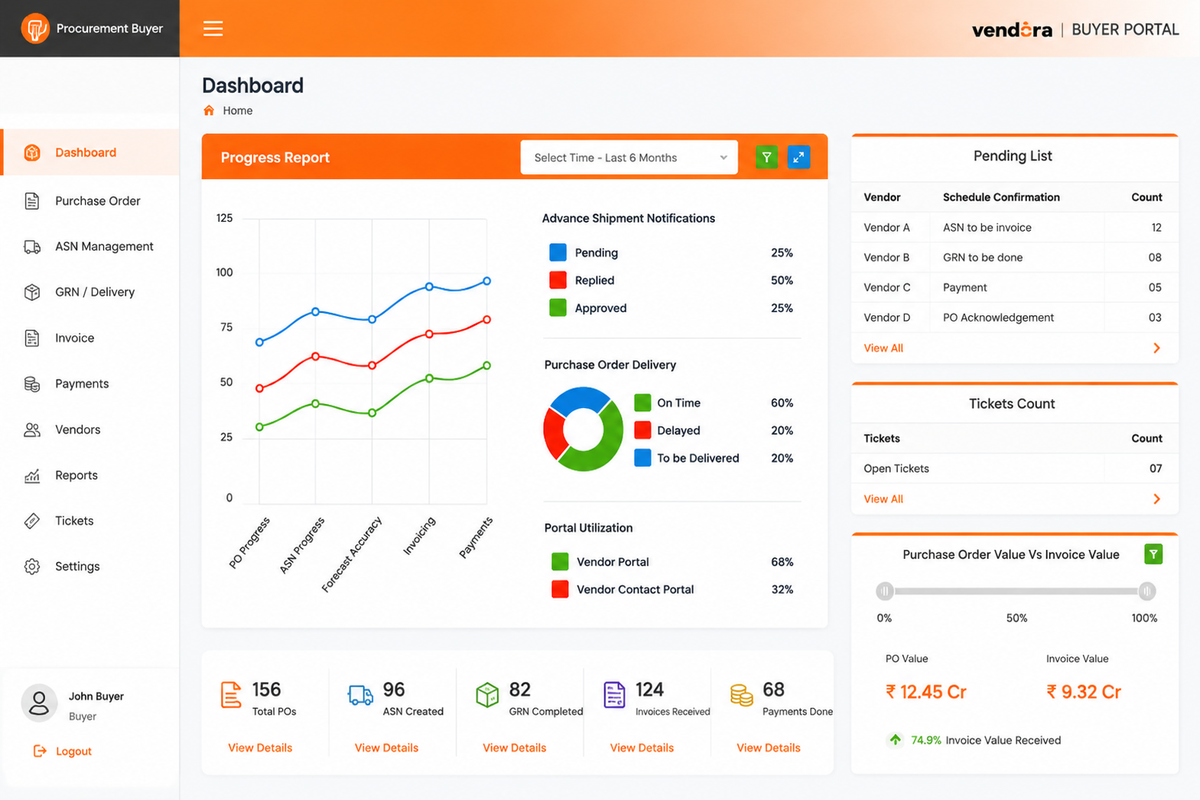
Example ERP-connected dashboard view for monitoring SAP vendor portal workflows, transaction visibility, vendor actions, failed syncs, and procurement exceptions.
Key Benefits of SAP ERP Integration in Vendor Management Software
Improved Data Accuracy
Reduce repeated manual data entry between systems and improve procurement data quality.
- Reduced duplicate entry
- Cleaner transaction status
- Improved data consistency
- Lower manual error risk
Streamlined Procurement Process
Support vendor-facing workflows around RFQ, PO visibility, ASN submission, invoice tracking, and payment-status communication.
- PO visibility
- ASN submission
- Invoice tracking
- Payment communication
Data Synchronization
Help stakeholders work with more consistent information across procurement, vendor collaboration, finance, stores, and quality workflows.
- ERP-backed records
- Vendor portal updates
- Status visibility
- Reduced duplication
Enhanced Reporting and Analytics
Generate better reports around open POs, delayed ASN, GRN exceptions, invoice aging, payment queries, and vendor performance.
- Open transaction reports
- Vendor performance
- Invoice aging
- Exception dashboards
Reduced Vendor Follow-Ups
Vendors can check approved transaction status through the portal instead of repeatedly calling procurement or finance teams.
- Fewer inbound calls
- Lower email dependency
- Better transparency
- Faster query handling
Higher Procurement Efficiency
Help buyers, vendors, finance, stores, and quality teams work with clearer ownership, status, and accountability.
- Faster communication
- Clearer ownership
- Better collaboration
- Audit-ready records
SAP / ERP Data Objects Vendora Can Support
Vendor Master Data
Supplier profile, vendor code, company details, contact information, tax data, bank details, and onboarding status.
Purchase Orders
PO number, item details, quantity, delivery date, plant, buyer, acknowledgement, rejection reason, and commitment.
ASN and Shipment Details
Advance shipment notice, dispatch quantity, vehicle details, transporter information, arrival date, and shipment documents.
GRN and Quality Status
Goods receipt status, received quantity, accepted quantity, rejected quantity, inspection remarks, and discrepancy details.
Invoice Status
Invoice number, invoice upload, supporting documents, matching status, accounting status, mismatch reason, and aging.
Payment Status
Payment progress, payment hold reason, expected payment update, paid status, and vendor finance query visibility.
Possible SAP ERP Integration Methods
API Integration
Exchange approved transaction data between Vendora and SAP or ERP systems for real-time or near-real-time workflows.
IDoc / BAPI
Use SAP-supported integration options depending on the customer’s SAP setup and technical governance.
Middleware
Use SAP PI/PO, SAP CPI, MuleSoft, Boomi, or other enterprise integration layers where required.
SFTP / File Exchange
Use scheduled file exchange for controlled data transfer where API or middleware is not required initially.
Manual Import / Export
Support early implementation phases, pilot rollouts, or controlled data migration activities.
Hybrid Integration
Use APIs for critical workflows and file exchange for reports, legacy objects, or low-frequency data.
Manual Process vs ERP-Only Process vs Vendora SAP Vendor Portal Layer
| Manual Email / Spreadsheet Process | ERP-Only Process | Vendora Vendor Portal Layer |
|---|---|---|
| Supplier information is collected through emails, forms, and manual document folders, causing incomplete onboarding records. | SAP or ERP stores vendor master records, but external supplier data collection may still happen outside the system. | Vendora collects supplier details, documents, approvals, and onboarding status before ERP master-data update. |
| PO copies are emailed to suppliers, and buyers manually confirm whether vendors received or accepted them. | SAP or ERP creates and stores purchase orders, but supplier acknowledgement may happen outside ERP. | Vendora publishes PO visibility to vendors and captures acknowledgement, rejection, clarification, or delivery confirmation. |
| Shipment readiness is tracked by calls, emails, and spreadsheet updates, creating unclear dispatch commitment. | SAP or ERP may store inbound delivery or goods movement data after internal processing. | Vendora lets vendors submit ASN, dispatch details, transporter information, documents, and expected arrival updates. |
| Stores and procurement teams manually coordinate material receipt, shipment documents, and missing delivery information. | ERP captures goods receipt once internal users post the transaction. | Vendora improves pre-receipt visibility by connecting ASN, delivery documents, GRN status, and receiving updates. |
| Quality rejection details are shared through email, phone calls, or separate files, making corrective action hard to track. | ERP may contain inspection or quality records, but vendor-facing explanation is often limited. | Vendora can share configured quality status, rejected quantity, discrepancy reason, and corrective-action communication. |
| Vendors send invoices and supporting documents through email, creating duplicate follow-ups and document gaps. | ERP records invoice verification and accounting status after finance processing. | Vendora allows invoice submission, document attachment, invoice-status tracking, and finance query reduction. |
| Payment queries are handled through repeated calls to procurement or finance teams, increasing escalation volume. | ERP stores payment run, open item, clearing, and vendor ledger data internally. | Vendora shows approved payment visibility, payment hold reasons, and payment progress where enabled by finance. |
| Procurement communication is scattered across inboxes, personal follow-up records, and manual trackers. | ERP keeps transaction data but may not capture full supplier collaboration history. | Vendora creates a controlled collaboration record around SAP/ERP objects such as vendor master, PO, GRN, invoice, and payment. |
| Reports are manually prepared from emails, Excel sheets, ERP exports, and individual team updates. | ERP reports show transaction data but may not expose supplier response, delay, or communication context. | Vendora adds supplier-facing workflow reports for pending actions, exceptions, acknowledgement delays, invoice status, and vendor communication. |
Before and After SAP Vendor Portal Integration
| Area | Before Vendora | With Vendora SAP / ERP Integration |
|---|---|---|
| Vendor Communication | Vendors call or email buyers for PO, GRN, invoice, and payment updates. | Vendors can access approved status updates through a structured vendor portal. |
| Purchase Orders | PO details are available in ERP, but vendors may not have easy self-service visibility. | Vendors can view POs and acknowledge, reject, clarify, or confirm delivery commitment. |
| ASN | Shipment details are shared through emails, calls, or manual documents. | Vendors submit ASN with dispatch details, vehicle information, and shipment documents. |
| GRN | Vendors repeatedly ask stores or purchase teams for goods receipt status. | GRN and quality status can be shared based on approved visibility rules. |
| Invoice | Invoice movement and mismatch status require manual finance follow-ups. | Invoice upload, document gaps, and status movement can be tracked through Vendora. |
| Payment | Finance teams receive repeated payment-status calls and emails from vendors. | Payment-status visibility and hold reasons can be shared where configured. |
| Reporting | Procurement reporting depends on manual ERP exports and spreadsheets. | Dashboards can support open transactions, exceptions, and vendor performance visibility. |
Who Benefits from SAP Vendor Portal Integration?
Procurement Teams
Track vendor acknowledgement, PO exceptions, ASN, pending documents, supplier responses, and procurement bottlenecks.
Vendors and Suppliers
View approved transaction status, submit documents, acknowledge POs, upload invoices, raise tickets, and reduce follow-ups.
Finance Teams
Reduce invoice and payment-status queries by giving vendors controlled visibility into invoice movement and payment progress.
Stores and Quality Teams
Improve communication around ASN, goods receipt, accepted quantity, rejected quantity, quality remarks, and discrepancies.
IT and ERP Teams
Manage integration rules, data ownership, security controls, access permissions, logs, exceptions, and governance.
Management Teams
Monitor vendor performance, procurement delays, invoice aging, payment query volume, and workflow efficiency.
SAP ERP Integration KPIs to Track
PO
PO acknowledgement time, pending confirmations, rejection reasons, and delayed vendor responses.
ASN
ASN submission rate, delayed dispatches, shipment document gaps, and delivery visibility.
GRN
Pending GRN status, accepted quantity, rejected quantity, and discrepancy closure time.
Invoice
Invoice aging, missing documents, mismatch cases, and accounting status visibility.
Payment
Payment-status query volume, hold reasons, paid status updates, and finance follow-ups.
Vendors
Vendor portal adoption, active logins, pending vendor actions, and self-service completion.
Integration
Successful sync count, failed sync count, retry status, error logs, and exception handling.
Reports
Open transactions, delayed actions, workflow exceptions, and supplier performance reports.
Security, Ownership and Integration Governance
- ERP remains the system of record: SAP or ERP can continue to own master data and financial transactions.
- Vendora supports vendor collaboration: Vendora improves supplier-facing workflows, visibility, communication, and exception handling.
- Role-based access: Buyers, vendors, finance, quality, stores, admins, and leadership can receive controlled access.
- Error logs and retries: Integration should include monitoring for failed records, retries, and exception ownership.
- Data visibility rules: Payment, invoice, GRN, and other sensitive statuses should be shared only where approved.
Related Vendora Product Pages
SAP Vendor Portal and ERP Integration FAQs
What is SAP vendor portal integration?
SAP vendor portal integration connects vendor-facing workflows with SAP-backed procurement data. It helps vendors view approved transaction status, submit documents, acknowledge POs, upload invoices, and communicate with buyers through a structured portal.
Does Vendora replace SAP?
No. Vendora does not need to replace SAP. SAP can remain the system of record while Vendora works as a vendor-facing collaboration layer for procurement visibility, communication, documents, and exceptions.
Can Vendora work as a vendor portal for SAP?
Yes. Vendora can work as a vendor portal for SAP-backed procurement workflows, helping suppliers access approved PO, ASN, GRN, invoice, payment, and ticketing workflows depending on configuration.
Which SAP data objects can be connected with Vendora?
Vendora can support workflows around vendor master data, purchase orders, ASN, GRN, invoice status, payment status, vendor documents, and procurement reports depending on the integration scope.
What integration methods can be used?
Possible methods include APIs, IDoc, BAPI, middleware such as SAP PI/PO or CPI, SFTP or file exchange, manual import/export, or a hybrid model depending on the customer’s ERP landscape.
Can vendors track invoice and payment status?
Yes, where enabled. Vendors can view invoice movement, missing documents, payment status, and hold reasons based on finance-approved visibility rules.
Who should be involved in SAP ERP integration planning?
Procurement, finance, IT, ERP administrators, implementation teams, stores, quality, and key business users should align on data ownership, workflow rules, access permissions, security, and rollout priorities.
How can we evaluate Vendora for SAP vendor portal integration?
Book a product demo and share your SAP or ERP version, vendor count, monthly PO volume, invoice volume, required modules, integration urgency, and expected go-live timeline.
Ready to Build a SAP-Connected Vendor Portal?
Book a Vendora demo to see how SAP vendor portal workflows, PO visibility, ASN, GRN, invoice tracking, payment status, vendor ticketing, reports, and ERP-connected procurement collaboration can work for your organization.
Book Product Demo Request Quote![A modern smartphone showing the [Vendor Portal Management System] dashboard for on-the-go vendor collaboration.](https://www.vendorascmsoftware.com/wp-content/themes/vendora/images/phone.webp)
