

Request for Quote Software for Procurement and Vendor Management
Vendora Request for Quote software helps procurement teams create RFQs, invite selected vendors, collect supplier quotations, negotiate revised rates, compare quotes, approve suppliers, and maintain clear RFQ history inside one structured vendor management workflow.
Replace scattered emails, spreadsheets, calls, and manual quotation comparison with a digital RFQ management system built for manufacturing and procurement-driven organizations.
Create RFQs
Create RFQs with item details, delivery date, quantity, specifications, terms, and documents.
Invite Vendors
Send RFQs to selected vendors or multiple suppliers from your vendor management database.
Compare Quotes
Evaluate supplier quotations based on price, delivery time, quality, remarks, and capability.
Approve Supplier
Accept, negotiate, hold, regret, or approve vendor quotes through a controlled RFQ workflow.
Why Companies Need RFQ Management Software
Slow Quote Collection
Buyers spend too much time sending RFQs, tracking vendor replies, checking quote completeness, and following up for revised prices.
Manual Quote Comparison
Supplier quotations are often compared across spreadsheets, emails, attachments, and buyer notes, increasing errors and decision delays.
Weak Negotiation Visibility
Revised rates, vendor remarks, rejection reasons, on-hold decisions, and approval history become difficult to trace when negotiation is not centralized.
Vendora Turns RFQ Management Into a Structured Procurement Workflow
Vendora RFQ Dashboard Preview
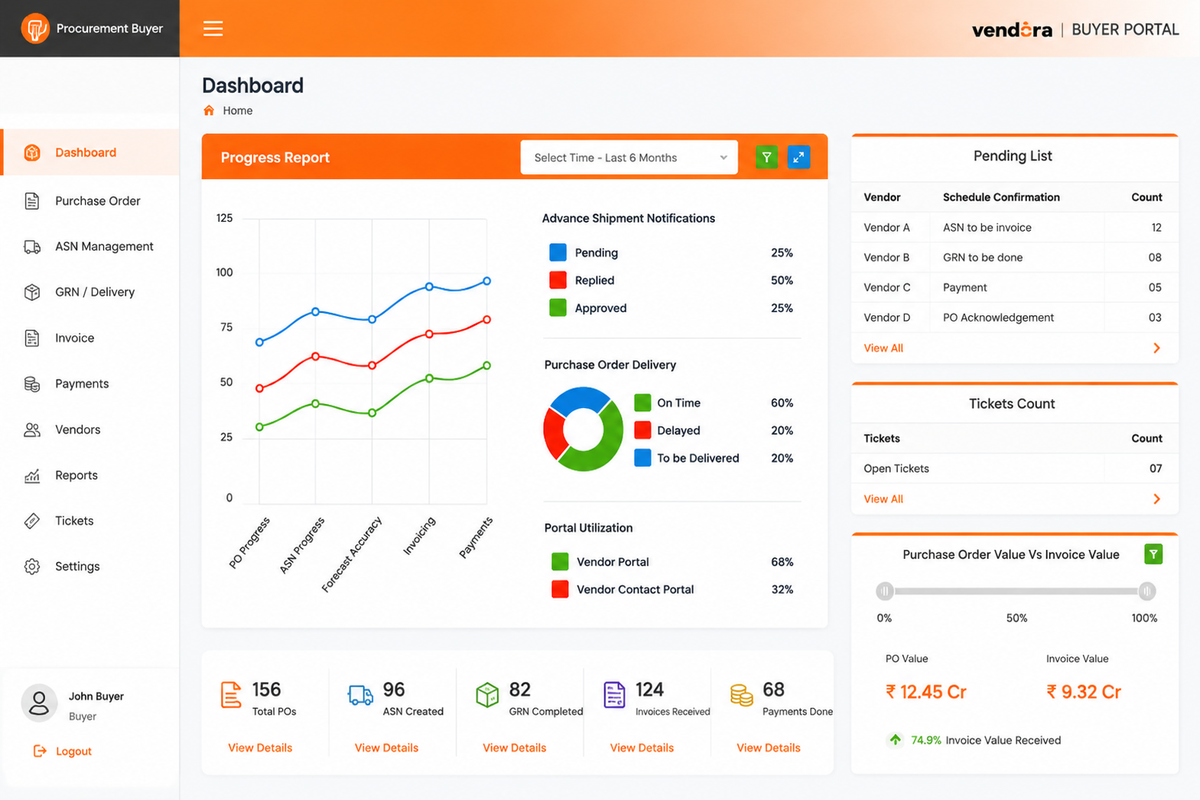
Example RFQ dashboard view for monitoring quote collection, vendor responses, comparison status, and approval progress.
Core Capabilities of Vendora RFQ Management Software
RFQ Creation
Create RFQs with product or service details, delivery expectations, quantity, specifications, commercial terms, and supporting documents.
- Product or service details
- Quantity and specifications
- Delivery date and terms
- Supporting document attachment
Vendor Selection
Invite selected vendors, multiple suppliers, or supplier groups from the vendor management database.
- Selected vendor list
- Multiple vendor invitation
- Supplier category selection
- Vendor participation tracking
Quote Submission
Vendors can submit price, delivery commitment, remarks, attachments, and required commercial details through the RFQ workflow.
- Vendor quote entry
- Delivery commitment
- Commercial remarks
- Attachment upload
Negotiation Workflow
Buyers can request revised rates and vendors can respond with updated prices, revised terms, and negotiation remarks.
- Revised rate request
- Vendor negotiation response
- Negotiation remarks
- Final quote history
Quote Comparison
Compare vendor quotes using price, delivery time, quality, remarks, supplier capability, and buyer-defined evaluation criteria.
- Side-by-side quote review
- Price comparison
- Delivery comparison
- Supplier evaluation support
Approval and Closure
Approve the selected quote, keep vendors on hold, reject unsuitable responses, regret RFQs, or close the RFQ decision with status visibility.
- Approve supplier quote
- Responded-on-hold status
- Regret RFQ tracking
- RFQ closure history
RFQ Process Consists of 3 Phases
Preparation Phase
The buyer creates the RFQ and defines item details, selected vendors, delivery requirement, terms, and attachments.
- Create RFQ by buyer
- Select vendors or supplier groups
- Add product or service details
- Define delivery date and requirements
Processing Phase
Vendors receive the RFQ, submit quotations, respond to negotiation requests, revise rates, or regret participation.
- View pending vendor replies
- Negotiate revised rates
- Respond to negotiation
- Accept, hold, or regret RFQ
Closing Phase
Buyers evaluate supplier quotes and approve the vendor that best matches price, delivery, quality, capability, and business fit.
- Evaluate and compare quotes
- Review vendor remarks
- Approve selected quote
- Close RFQ decision
Before and After Vendora RFQ Module
| Area | Before Vendora | With Vendora RFQ Module |
|---|---|---|
| RFQ Creation | Buyers prepare RFQs using emails, spreadsheets, and manual documents. | Buyers create structured RFQs with item details, vendors, terms, and attachments. |
| Vendor Communication | Vendor replies are tracked through email threads, calls, and separate files. | Vendor responses are captured inside the RFQ workflow with status visibility. |
| Quote Comparison | Quotes are compared manually across spreadsheets and attachments. | Quotes can be reviewed using structured supplier response data. |
| Negotiation | Rate negotiation happens through scattered messages and unclear revision history. | Revised rates and negotiation remarks are tracked in the RFQ system. |
| Decision History | Approval, rejection, or hold status may not be centrally visible. | RFQ decisions and status history remain easier to review and audit. |
RFQ as Part of a Connected Procurement Workflow
Vendora RFQ management is part of a wider procurement and vendor management workflow. After quote approval, teams can continue with purchase order management, vendor acknowledgement, ASN, GRN, invoice tracking, payment visibility, vendor ticketing, and reports.
This helps companies move from isolated quotation collection to a more connected procurement process where buyers, vendors, finance, stores, quality, and management teams work with better visibility.
Request for Quote Software FAQs
What is Request for Quote software?
Request for Quote software helps buyers create RFQs, invite suppliers, collect quotations, negotiate revised rates, compare vendor responses, approve suppliers, and maintain RFQ history.
How does Vendora help with RFQ management?
Vendora helps buyers manage RFQ creation, vendor selection, quote submission, negotiation, comparison, approval, on-hold status, regret status, and RFQ reports in one workflow.
Can buyers send RFQs to multiple vendors?
Yes. Buyers can send RFQs to selected vendors, multiple vendors, or supplier groups from the vendor management software database.
Can vendors submit revised rates?
Yes. Vendora supports RFQ negotiation workflows where buyers can request revised rates and vendors can respond with new prices and remarks.
What happens after quote approval?
After quote approval, the procurement workflow can continue toward purchase order creation, vendor acknowledgement, ASN, GRN, invoice tracking, and payment visibility.
Ready to Digitize Your RFQ Process?
Book a Vendora demo to see how RFQ creation, vendor quote submission, negotiation, quote comparison, supplier approval, purchase order workflow, and ERP-connected procurement visibility can work for your organization.
Book Product Demo Request Quote![A modern smartphone showing the [Vendor Portal Management System] dashboard for on-the-go vendor collaboration.](https://www.vendorascmsoftware.com/wp-content/themes/vendora/images/phone.webp)
