

Vendor Onboarding Software for Faster Supplier Registration and Approval
Vendora vendor onboarding software helps procurement, finance, quality, admin, IT, and supplier teams digitize vendor registration, supplier information collection, document submission, internal approval, payment-term validation, vendor activation, and audit-ready onboarding records.
Replace email-based vendor onboarding, spreadsheet tracking, manual document follow-ups, and unclear approval status with an automated supplier onboarding workflow built for manufacturing and procurement-driven organizations.
Supplier Registration
Collect vendor company details, contact details, tax information, bank details, categories, and required business information.
Document Collection
Track uploaded documents, missing files, validation status, approval readiness, and resubmission requests.
Approval Workflow
Route onboarding through procurement, finance, quality, admin, and other internal reviewers.
Vendor Activation
Activate suppliers only after required details, documents, payment terms, and approval checks are completed.
Why Companies Need Vendor Onboarding Software
Manual Supplier Registration
Procurement teams spend too much time collecting vendor details, checking missing fields, and re-entering supplier information into internal systems.
Unclear Document Status
Vendor documents are often shared through email, making it difficult to know which files are uploaded, missing, rejected, expired, or awaiting review.
Delayed Internal Approval
Procurement, finance, quality, admin, and IT approvals can get delayed when ownership, reviewer status, and correction requests are not visible in one place.
Vendora Turns Vendor Onboarding Into a Structured Workflow
Vendora Vendor Onboarding Dashboard Preview
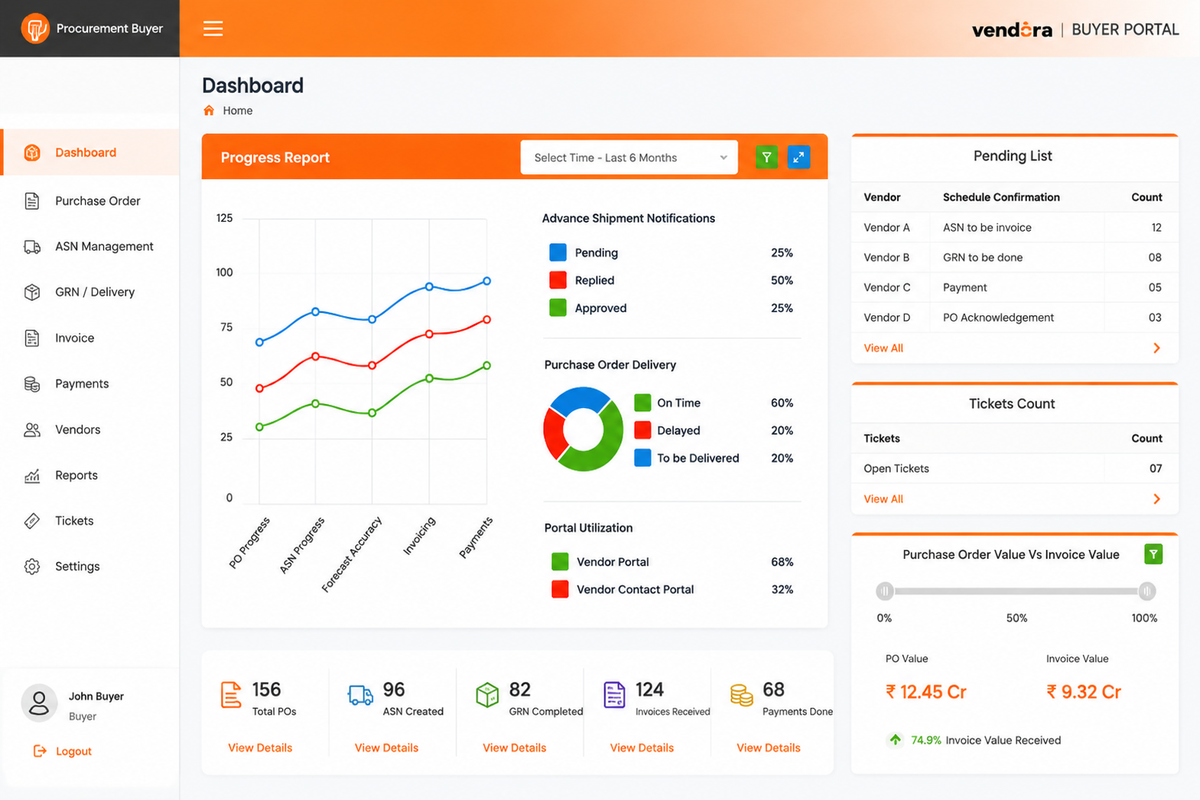
Example onboarding dashboard view for monitoring vendor registration, document collection, approval status, and supplier activation progress.
Core Capabilities of Vendora Vendor Onboarding Software
Vendora digitizes high-friction onboarding workflows used by procurement, finance, quality, admin, IT, and supplier teams.
Vendor Registration Form
Capture supplier information through structured digital forms instead of scattered emails, paper documents, and manual spreadsheets.
- Company details
- Contact information
- Supplier category
- Business location
Document Upload and Tracking
Collect and track documents required for procurement validation, finance review, quality checks, and compliance readiness.
- Required document checklist
- Missing document status
- Rejected document tracking
- Resubmission workflow
Vendor Verification
Verify supplier information before vendor activation to reduce onboarding risk and improve data accuracy.
- Profile validation
- Tax and bank checks
- Document validation
- Reviewer remarks
Approval Workflow
Route vendor onboarding requests to the right internal teams based on supplier category, document type, risk level, or company approval policy.
- Procurement approval
- Finance review
- Quality validation
- Admin approval
Payment Terms and SLA Capture
Record payment terms, service-level expectations, business conditions, and communication rules during vendor onboarding.
- Payment terms
- Service-level agreements
- Communication rules
- Business conditions
Vendor Activation
Activate approved vendors only after required information, documents, reviews, and approval checks are completed.
- Approved vendor status
- Unique vendor ID
- Portal login access
- Transaction readiness
Digital Forms to Enroll Vendor Details
Invite Supplier
The buyer or procurement team invites a supplier to register through the vendor onboarding portal.
Vendor Fills Form
The supplier fills in company details, contact details, tax details, bank details, and category information.
Upload Documents
The supplier uploads certificates, business documents, finance-related files, and other required documents.
Internal Verification
Procurement, finance, quality, and admin users verify vendor information and documents.
Approval or Correction
Reviewers can approve the vendor, reject the submission, or request corrections for missing details.
Vendor Login Access
After approval, the supplier receives confirmation and access to the online vendor management platform.
Before and After Vendora Vendor Onboarding
| Area | Before Vendora | With Vendora |
|---|---|---|
| Vendor Registration | Vendor details are collected through email, paper forms, spreadsheets, or manual entry. | Vendors submit registration details through a structured digital onboarding form. |
| Document Collection | Documents are sent through email and tracked manually by procurement or admin teams. | Documents are uploaded, reviewed, approved, rejected, or requested again through the workflow. |
| Approval Status | Teams depend on manual follow-ups to know where the onboarding request is pending. | Procurement, finance, quality, and admin approval status is visible in one place. |
| Vendor Activation | Vendors may be activated without complete visibility into missing information or approvals. | Approved vendors can be activated only after required details and documents are completed. |
| Supplier Relationship | Initial supplier communication may be unclear, inconsistent, and difficult to track. | Vendors understand expectations, payment terms, communication rules, and onboarding status from the start. |
Vendor Onboarding KPIs to Track
Registration
Submitted registrations, incomplete forms, correction requests, and rejected submissions.
Documents
Missing documents, pending uploads, rejected files, expired documents, and resubmissions.
Approval
Pending approvals, reviewer aging, approval cycle time, and department-wise delays.
Activation
Approved vendors, onboarding completion rate, pending activation, and activation time.
Vendor Onboarding with ERP-Ready Supplier Data
Vendora helps companies collect cleaner supplier information before vendor activation. In enterprise environments, SAP, Oracle, or another ERP may remain the system of record after approved vendor data is validated.
Vendora supports the onboarding layer by helping teams collect details, review documents, validate supplier information, manage approvals, maintain audit-ready records, and prepare vendors for future procurement transactions.
Vendor Onboarding Software FAQs
What is vendor onboarding software?
Vendor onboarding software helps companies register suppliers, collect vendor information, upload documents, verify details, route approvals, define relationship terms, activate vendors, and maintain onboarding records.
How does Vendora automate vendor onboarding?
Vendora automates vendor onboarding with digital registration forms, document upload, approval workflows, correction requests, notifications, status tracking, and vendor activation.
Can vendors submit documents through Vendora?
Yes. Vendors can upload required documents during registration. Internal teams can review, approve, reject, or request corrections based on the onboarding workflow.
Who approves vendors during onboarding?
Vendor approval can include procurement, finance, quality, admin, IT, or other internal departments depending on the supplier category and company approval process.
Can Vendora track missing vendor documents?
Yes. Vendora can help teams track missing documents, pending uploads, rejected files, expired documents, correction requests, and vendor resubmission status.
How can we evaluate Vendora vendor onboarding software?
Book a product demo and share your supplier count, required documents, approval departments, onboarding challenges, ERP system, and expected go-live timeline.
Ready to Automate Vendor Onboarding?
Book a Vendora demo to see how supplier registration, document collection, approval workflow, correction requests, vendor activation, onboarding reports, and audit-ready records can work for your procurement process.
Book Product Demo Request Quote![A modern smartphone showing the [Vendor Portal Management System] dashboard for on-the-go vendor collaboration.](https://www.vendorascmsoftware.com/wp-content/themes/vendora/images/phone.webp)
