

Purchase Order Management Software for Vendor and Procurement Teams
Vendora purchase order management software helps procurement teams create, approve, release, track, and manage purchase orders through a structured vendor management workflow. Buyers can share POs with vendors, vendors can acknowledge or clarify orders, and internal teams can track PO status, delivery commitment, ASN, GRN, invoice, and payment progress.
Replace manual PO follow-ups, email-based communication, spreadsheet tracking, and disconnected status updates with a digital purchase order management system built for procurement-heavy and manufacturing organizations.
PO Visibility
Give buyers and vendors clear visibility into purchase order details, status, delivery dates, and pending actions.
Vendor Acknowledgement
Vendors can acknowledge, reject, clarify, or confirm delivery commitment through the portal.
Digital Archive
Maintain PO history, communication, documents, approvals, and vendor responses in one searchable location.
Process Control
Improve access control, approvals, tracking, audit history, and procurement accountability.
Why Companies Need Purchase Order Management Software
Manual PO Follow-Ups
Buyers spend too much time chasing suppliers for PO acceptance, delivery confirmation, clarification, dispatch status, and invoice readiness.
Disconnected PO Status
PO acknowledgement, delivery updates, ASN, GRN, invoice status, and payment information often sit across different files, systems, and email threads.
Limited Accountability
Teams struggle to know which vendor has acknowledged the PO, which delivery is delayed, which invoice is pending, or who owns the next action.
Vendora Turns Purchase Orders Into a Connected Workflow
Vendora PO Dashboard Preview
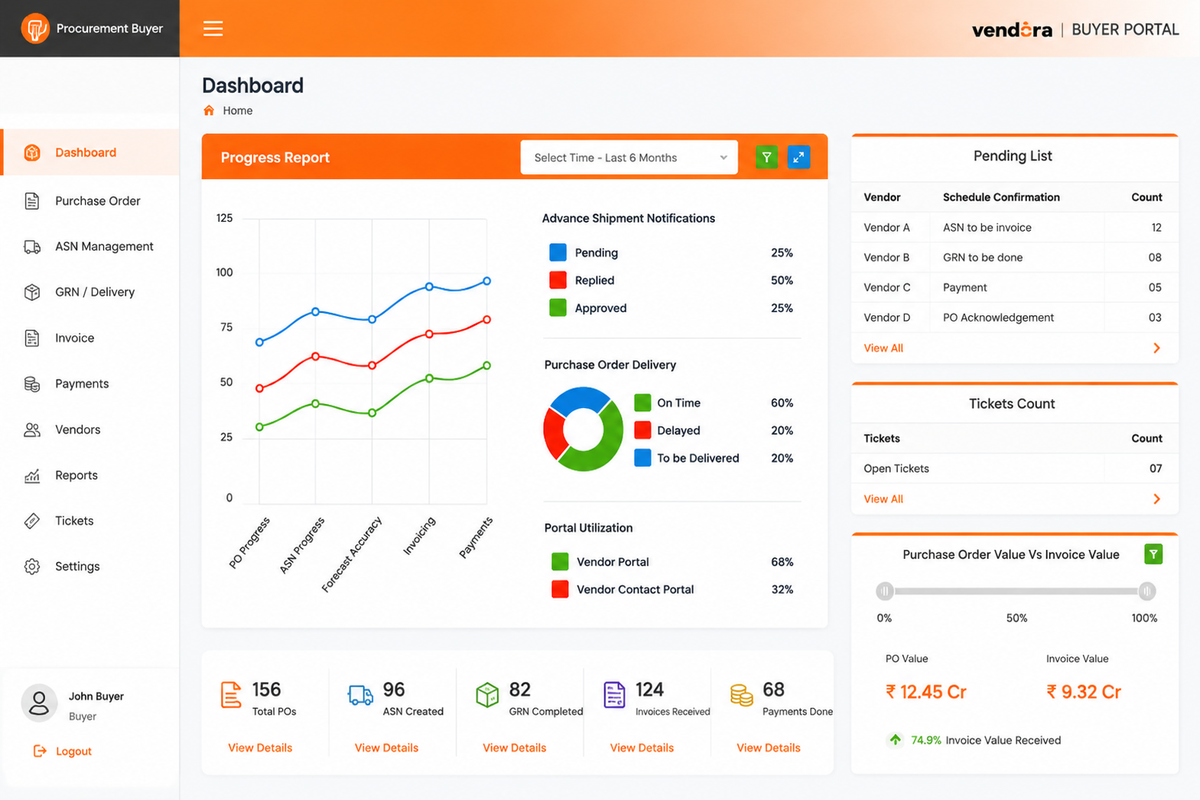
Example PO dashboard view for monitoring purchase order status, vendor acknowledgement, delivery progress, and PO-related communication.
Core Capabilities of Vendora Purchase Order Management Software
Purchase Order Creation
Create or manage purchase orders with product details, quantities, delivery dates, terms, vendor details, and supporting information.
- PO number and item details
- Quantity and delivery date
- Terms and conditions
- Vendor and buyer details
PO Approval Workflow
Route purchase orders to the right personnel or approval authority before releasing them to the vendor.
- Approval routing
- Reviewer remarks
- Approval status
- Audit trail
Vendor PO Acknowledgement
Allow vendors to confirm whether they accept the PO, need clarification, or cannot commit to the delivery requirement.
- Accept PO
- Reject PO
- Clarification request
- Delivery commitment
Real-Time PO Status Tracking
Track when the PO was sent, received, acknowledged, delivered, invoiced, and paid where configured.
- PO sent status
- Vendor received status
- Delivery status
- Invoice and payment visibility
PO Communication History
Centralize PO-related communication, clarifications, remarks, documents, and vendor responses in one place.
- Buyer-vendor messages
- Clarification notes
- Document storage
- Historical PO reference
Digital PO Archive
Use digital PO history to search previous orders, vendor track records, item rates, delivery performance, and terms.
- PO history
- Vendor track record
- Rate and terms reference
- Searchable archive
Security and Access Control
Assign credentials, permissions, and authorization levels to protect confidential PO data and vendor information.
- Role-based access
- Vendor-level visibility
- Internal user permissions
- Secure data handling
ASN, GRN and Invoice Linkage
Connect purchase orders with ASN, delivery updates, goods receipt, invoice submission, and payment visibility workflows.
- ASN submission
- GRN tracking
- Invoice upload
- Payment status visibility
PO Reports and Dashboards
Monitor open POs, pending vendor acknowledgements, delayed deliveries, partial receipts, invoice gaps, and supplier performance.
- Open PO report
- Pending acknowledgement report
- Delivery delay report
- Vendor performance report
Buyer and Vendor Actions in the PO Workflow
| Workflow Step | Buyer Action | Vendor Action | Business Value |
|---|---|---|---|
| Create PO | Create or release PO with item, quantity, delivery date, terms, and vendor details. | Receives PO visibility through the vendor portal where configured. | Standardizes PO communication and reduces manual document sharing. |
| Acknowledge PO | Tracks whether the vendor has accepted, rejected, or requested clarification. | Accepts PO, rejects PO, raises clarification, or confirms delivery commitment. | Reduces repeated calls and emails for PO confirmation. |
| Track Delivery | Monitors delivery commitment, dispatch updates, ASN, and delivery exceptions. | Updates delivery plan and submits ASN or shipment details where enabled. | Improves delivery visibility and stores readiness. |
| GRN and Invoice | Tracks goods receipt, accepted quantity, invoice upload, and invoice movement. | Views GRN status and uploads invoice documents where configured. | Connects PO execution with finance and stores visibility. |
| Close PO | Reviews PO status, pending actions, invoice movement, and payment progress. | Tracks closure status and payment visibility based on access rules. | Improves accountability across procurement, stores, finance, and vendors. |
Purchase Order Before and After Vendora
| PO Area | Before Vendora | With Vendora PO Management |
|---|---|---|
| PO Communication | PO updates are shared through emails, phone calls, and manual follow-ups. | Vendors can view and respond to POs through a structured vendor portal. |
| PO Acknowledgement | Buyers manually chase vendors for PO acceptance or rejection. | Vendors can accept, reject, clarify, or confirm delivery commitment in the system. |
| Delivery Tracking | Delivery status is tracked through calls, emails, and separate documents. | POs can be linked with ASN, dispatch details, GRN, and delivery updates. |
| PO History | Previous orders and communication are stored across files or emails. | PO history, documents, remarks, and vendor responses stay in a searchable archive. |
| Security | PO data may be shared across uncontrolled email threads or files. | Role-based access helps control who can view, update, approve, or respond to PO data. |
| Reporting | Open PO reports and vendor response reports are prepared manually. | Dashboards can track pending PO acknowledgements, delayed deliveries, and supplier performance. |
Who Uses Vendora Purchase Order Management Software?
Buyers and Procurement Teams
Create, approve, release, track, and manage purchase orders, vendor responses, delivery commitments, and exceptions.
Vendors and Suppliers
View purchase orders, acknowledge orders, confirm delivery dates, request clarifications, submit ASN, and upload invoices.
Finance Teams
Track invoice readiness, PO-invoice alignment, payment status, missing documents, and vendor payment queries.
Stores and Quality Teams
Track delivery receipt, accepted quantity, rejected quantity, GRN status, inspection remarks, and discrepancy details.
IT and Admin Teams
Control users, access rights, workflow settings, security rules, notifications, integration options, and audit controls.
Management Teams
Monitor open POs, supplier delays, delivery commitments, invoice movement, procurement bottlenecks, and vendor performance.
Purchase Order KPIs to Track
PO Acknowledgement
Time taken by vendors to accept, reject, or clarify purchase orders.
Pending POs
Open purchase orders waiting for vendor response or internal action.
Delivery Commitment
Confirmed delivery dates, delayed commitments, and vendor delivery changes.
ASN Status
POs with ASN submitted, ASN pending, delayed dispatch, and shipment document gaps.
GRN Status
Received quantity, pending receipt, accepted quantity, rejected quantity, and discrepancy status.
Invoice Status
Invoices uploaded against POs, missing documents, invoice aging, and mismatch cases.
Payment Queries
Vendor payment follow-ups, hold reasons, finance clarifications, and payment visibility.
Vendor Performance
Response time, delivery reliability, PO closure rate, and repeated exceptions.
Purchase Order Management with ERP-Connected Workflows
Vendora can support purchase order workflows around SAP, Oracle, or other ERP-backed procurement systems. In many enterprise environments, ERP remains the system of record for purchase orders, goods receipt, invoices, accounting, and payments.
Vendora improves the buyer-vendor collaboration layer by helping vendors view approved POs, acknowledge orders, submit ASN, track GRN and invoice status, raise tickets, and reduce repeated follow-ups with procurement and finance teams.
Related Vendora Product Pages
Purchase Order Management Software FAQs
What is purchase order management software?
Purchase order management software helps companies create, approve, issue, track, and manage purchase orders between buyers and suppliers through a digital workflow.
How does Vendora help with purchase order management?
Vendora helps buyers manage PO creation, vendor acknowledgement, delivery commitment, ASN, GRN, invoice tracking, payment visibility, communication history, and PO reports.
Can vendors acknowledge purchase orders in Vendora?
Yes. Vendors can view purchase orders and respond with acceptance, rejection, clarification, or delivery commitment based on the configured workflow.
Can Vendora track PO status in real time?
Vendora can help teams track PO status, vendor response, delivery updates, ASN, GRN, invoice movement, and payment visibility where configured.
Does purchase order management reduce manual follow-ups?
Yes. A digital PO workflow reduces repeated calls and emails by giving buyers and vendors a structured way to view PO status, respond to orders, and track pending actions.
Can Vendora connect purchase orders with ASN, GRN, invoice, and payment?
Yes. Vendora can support connected workflows from purchase order to ASN, GRN, invoice upload, payment status visibility, vendor ticketing, and reports.
How can we evaluate Vendora purchase order management software?
Book a product demo and share your vendor count, monthly PO volume, ERP system, approval process, PO follow-up challenges, and expected go-live timeline.
Ready to Streamline Purchase Order Management?
Book a Vendora demo to see how PO creation, vendor acknowledgement, ASN, GRN, invoice tracking, payment visibility, vendor communication, reports, and ERP-connected workflows can work for your procurement process.
Book Product Demo Request Quote![A modern smartphone showing the [Vendor Portal Management System] dashboard for on-the-go vendor collaboration.](https://www.vendorascmsoftware.com/wp-content/themes/vendora/images/phone.webp)
