

Invoice Management Software for Vendor Invoice Tracking and Payment Visibility
Vendora invoice management software helps procurement, finance, accounts payable, and vendor teams manage invoice submission, invoice document tracking, invoice approval, invoice status visibility, payment scheduling, payment queries, and vendor communication through a structured workflow.
Replace vendor invoices handled through emails, spreadsheets, manual follow-ups, and disconnected finance updates with a digital invoice tracking system connected with PO, ASN, GRN, quality inspection, payment status, and ERP-backed procurement processes.
Invoice Upload
Allow vendors to submit invoices and supporting documents through a controlled vendor portal workflow.
Status Tracking
Track whether invoices are received, under review, approved, on hold, rejected, paid, or pending clarification.
Payment Visibility
Give vendors controlled visibility into payment status, hold reasons, payment schedule, and finance queries.
AP Reporting
Monitor invoice aging, pending approvals, missing documents, payment delays, and vendor payment queries.
Why Companies Need Invoice Management Software
Manual Invoice Follow-Ups
Vendors repeatedly call or email procurement and finance teams to check whether invoices are received, approved, rejected, on hold, or paid.
Missing Document Delays
Invoice processing slows down when supporting documents, PO reference, GRN reference, tax documents, or required attachments are missing or incorrect.
Low Payment Visibility
Finance teams struggle to communicate payment schedule, hold reasons, approval aging, and invoice status when tracking is not centralized.
Vendora Turns Invoice Management Into a Connected Workflow
Vendora Invoice Dashboard Preview
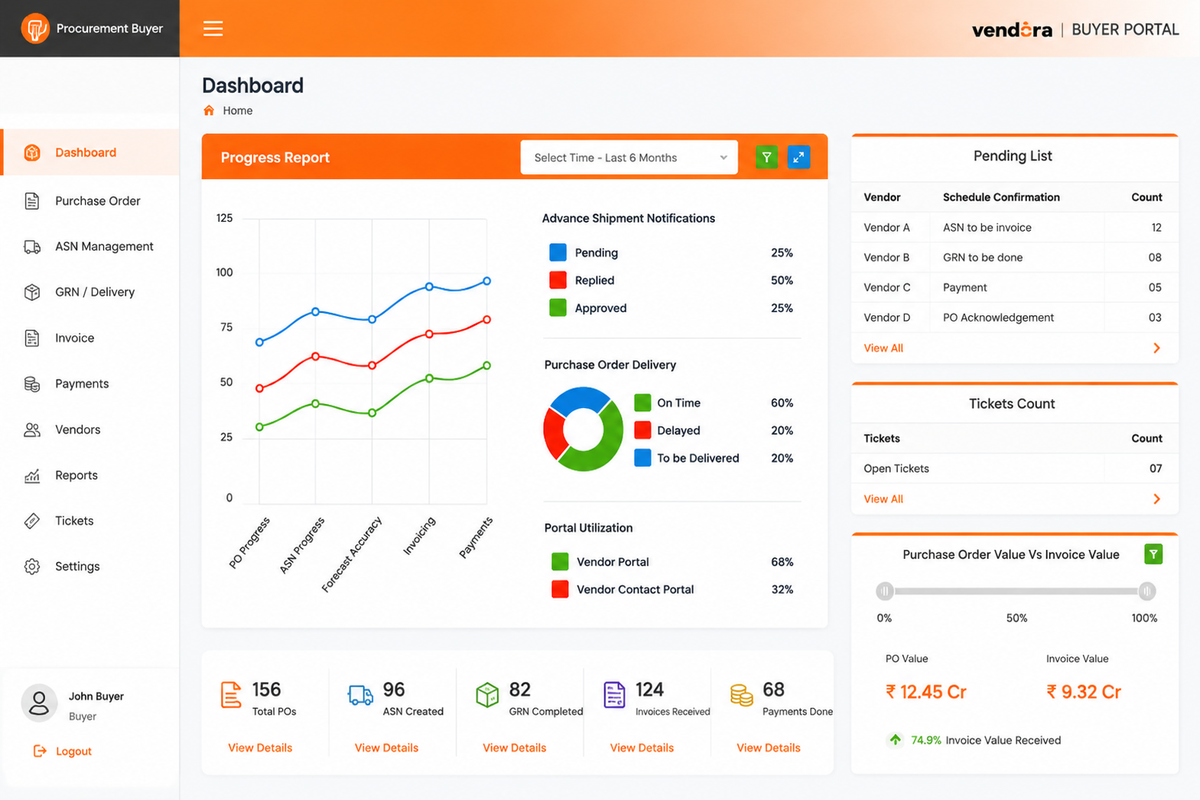
Example invoice dashboard view for monitoring invoice aging, document readiness, approval status, payment schedule, and vendor query resolution.
Core Capabilities of Vendora Invoice Management Software
Vendor Invoice Upload
Vendors can upload invoices and supporting documents through the portal instead of sending them through scattered emails.
- Invoice upload
- Supporting documents
- PO reference
- GRN reference
Invoice Document Tracking
Track required invoice documents, missing attachments, rejected files, resubmissions, and document readiness.
- Document checklist
- Missing document status
- Rejected document tracking
- Resubmission workflow
Invoice Matching Support
Support invoice review using PO, ASN, GRN, received quantity, accepted quantity, and approved workflow data.
- PO matching
- GRN matching
- Quantity validation
- Mismatch visibility
Approval Workflow
Route invoices to the right finance, procurement, or approval users based on the configured workflow.
- Reviewer assignment
- Approval status
- Rejection remarks
- Audit trail
Invoice Status Visibility
Monitor invoice progress from submission to review, approval, hold, rejection, payment scheduling, and paid status.
- Submitted status
- Under review status
- Approved or rejected status
- Paid or pending status
Payment Scheduling
Support payment planning based on invoice approval, due date, payment terms, finance rules, and cash-flow priorities.
- Due date tracking
- Payment terms
- Scheduled payment
- Payment hold reason
Vendor Payment Queries
Reduce repeated calls and emails by giving vendors a structured way to raise invoice or payment-related queries.
- Invoice query
- Payment query
- Owner assignment
- Resolution tracking
Invoice Aging Reports
Track overdue invoices, pending approvals, delayed payments, missing documents, and finance bottlenecks.
- Invoice aging
- Approval aging
- Overdue invoice report
- Payment delay report
Vendor Performance Insights
Analyze vendor invoice accuracy, missing document trends, repeated payment queries, and invoice compliance.
- Invoice accuracy
- Document compliance
- Query frequency
- Vendor scorecard input
Finance, Vendor, and Procurement Actions
| Workflow Step | Finance / AP Action | Vendor Action | Procurement Action | Business Value |
|---|---|---|---|---|
| Invoice Upload | Receives vendor invoice and supporting documents for review. | Uploads invoice, PO reference, GRN reference, and required documents. | Checks invoice readiness against PO, ASN, and GRN where required. | Reduces email-based invoice submission and missing document confusion. |
| Document Check | Reviews required attachments, tax details, and invoice completeness. | Resubmits missing or corrected documents where requested. | Supports validation with PO, quantity, delivery, or GRN information. | Improves invoice readiness before approval and payment planning. |
| Invoice Review | Reviews invoice amount, due date, approval status, and mismatch cases. | Tracks invoice status where visibility is enabled. | Responds to clarification if procurement input is required. | Improves accountability across finance and procurement users. |
| Payment Scheduling | Plans payment based on terms, due date, approval, and hold reasons. | Views payment schedule or hold status based on approved rules. | Supports vendor communication when invoice status affects procurement. | Reduces repeated vendor calls about payment status. |
| Query Resolution | Assigns and resolves invoice or payment-related queries. | Raises invoice query, payment query, or clarification request. | Assists with PO, GRN, delivery, or document-related queries. | Creates traceable query handling and faster issue closure. |
Invoice Management Before and After Vendora
| Invoice Area | Before Vendora | With Vendora Invoice Management |
|---|---|---|
| Invoice Submission | Vendors submit invoices through emails, printed copies, or disconnected file sharing. | Vendors upload invoices and supporting documents through a structured portal. |
| Document Tracking | Missing documents are tracked manually by finance or procurement users. | Required documents, missing attachments, and resubmissions can be tracked in the workflow. |
| Invoice Status | Vendors call or email to know whether invoices are received, approved, or paid. | Invoice status visibility can be provided based on approved finance rules. |
| Approval Workflow | Invoice approvals depend on manual routing and email reminders. | Invoices can move through configured review, approval, rejection, or correction workflows. |
| Payment Queries | Payment-related questions are scattered across calls and emails. | Vendor invoice and payment queries can be handled through a ticket-like workflow. |
| Reporting | Invoice aging and payment reports are prepared manually. | Reports can show invoice aging, approval delays, payment status, and vendor query trends. |
Who Uses Vendora Invoice Management Software?
Finance and Accounts Payable Teams
Review invoice submissions, track approval status, manage payment schedules, handle hold reasons, and monitor invoice aging.
Procurement Teams
Track invoice readiness against PO, ASN, GRN, vendor documents, and supplier communication.
Vendors and Suppliers
Upload invoices, attach documents, view status, respond to clarification requests, and raise payment queries.
Stores and Quality Teams
Support invoice readiness through GRN status, accepted quantity, rejected quantity, and quality inspection outcomes.
Management Teams
Monitor invoice aging, payment delays, vendor query volume, open liabilities, and AP process performance.
IT and Admin Teams
Configure users, permissions, workflow rules, invoice visibility, notifications, reports, and integration settings.
Invoice Management KPIs to Track
Invoice Aging
Invoices pending by age bucket, due date, approval status, or payment status.
Approval Time
Time taken from invoice submission to approval, rejection, hold, or clarification.
Missing Documents
Invoices blocked due to missing attachments, incorrect files, or resubmission requirements.
Payment Query Volume
Number of vendor calls, tickets, or follow-ups related to invoice and payment status.
On-Time Payment
Invoices paid within agreed payment terms or scheduled payment timeline.
Mismatch Cases
Invoice mismatch cases linked to PO, GRN, quantity, rate, tax, or document issues.
Vendor Accuracy
Supplier invoice accuracy based on correct submission, documents, and compliance.
AP Bottlenecks
Departments, approval users, or process steps causing invoice delays.
Invoice Management as Part of a Connected Procurement Workflow
Vendora invoice management is connected with the wider vendor management and procurement workflow. Invoice tracking can follow purchase order, ASN, goods receipt, and quality inspection activities, helping teams improve payment readiness and reduce vendor follow-ups.
In ERP-connected environments, SAP, Oracle, or another ERP may remain the system of record for accounting and payments, while Vendora improves vendor-facing invoice communication, document tracking, payment visibility, and query resolution.
Related Vendora Product Pages
Invoice Management Software FAQs
What is invoice management software?
Invoice management software helps companies receive, track, validate, approve, schedule, and monitor vendor invoices, supporting better payment visibility and accounts payable control.
How does Vendora help with invoice tracking?
Vendora helps vendors upload invoices, attach documents, track invoice status, respond to clarification requests, and view payment-related status where enabled by finance rules.
Can vendors upload invoices through Vendora?
Yes. Vendors can upload invoices and supporting documents through the Vendora portal against approved workflows.
Can Vendora track invoice approval status?
Yes. Vendora can help teams track whether invoices are submitted, under review, approved, rejected, on hold, paid, or pending clarification.
Does Vendora support payment scheduling?
Vendora can support payment visibility and scheduling workflows based on payment terms, due dates, approval status, finance rules, and ERP-connected processes.
Can invoice management reduce vendor follow-ups?
Yes. When vendors can view approved invoice and payment status, repeated calls and emails to finance and procurement teams can be reduced.
Can Vendora connect invoices with PO, ASN, GRN, and quality inspection?
Yes. Vendora can support connected workflows across purchase order, ASN, goods receipt, quality inspection, invoice upload, payment status visibility, and reports.
How can we evaluate Vendora invoice management software?
Book a product demo and share your vendor count, monthly invoice volume, ERP system, invoice approval process, payment challenges, and expected go-live timeline.
Ready to Improve Invoice Tracking and Payment Visibility?
Book a Vendora demo to see how invoice upload, document tracking, invoice approval, payment scheduling, payment status visibility, vendor queries, invoice aging reports, and ERP-connected workflows can work for your finance and procurement process.
Book Product Demo Request Quote![A modern smartphone showing the [Vendor Portal Management System] dashboard for on-the-go vendor collaboration.](https://www.vendorascmsoftware.com/wp-content/themes/vendora/images/phone.webp)
