

Goods Receipt Note Software for GRN Tracking and Vendor Delivery Visibility
Vendora Goods Receipt Note software helps stores, procurement, quality, finance, and vendor teams record goods received from suppliers, validate quantity, track accepted and rejected items, manage discrepancies, connect GRN with ASN and PO, and improve invoice readiness.
Replace manual GRN records, warehouse follow-ups, email-based receiving updates, and disconnected inventory communication with a digital GRN workflow that improves receipt accuracy, vendor accountability, procurement visibility, and invoice-to-payment control.
Goods Receipt
Record received goods against vendor, PO, ASN, delivery date, item quantity, and receiving location.
PO and ASN Matching
Compare received goods with purchase order details and ASN shipment information where configured.
Quantity Validation
Track received quantity, accepted quantity, rejected quantity, shortage, excess, and discrepancy status.
Invoice Readiness
Support invoice processing by connecting GRN status with invoice upload, payment visibility, and finance workflows.
What Is a Goods Receipt Note?
Vendora GRN Module
Vendora GRN module helps receiving teams record delivered goods, validate quantities, manage discrepancies, connect GRN with PO and ASN, and support invoice readiness.
Why Companies Need Goods Receipt Note Software
Manual Receiving Records
Stores teams often record received goods manually, making it difficult to track receipt status, quantity mismatch, delivery delays, and vendor accountability.
Disconnected PO, ASN and GRN Data
PO details, ASN shipment information, received quantity, accepted quantity, rejected quantity, and invoice readiness may remain disconnected across teams.
Delayed Invoice Processing
Finance teams may not know whether goods were received, accepted, rejected, or pending clarification before processing vendor invoices.
Vendora Turns GRN Into a Connected Receipt Workflow
Vendora GRN Dashboard Preview
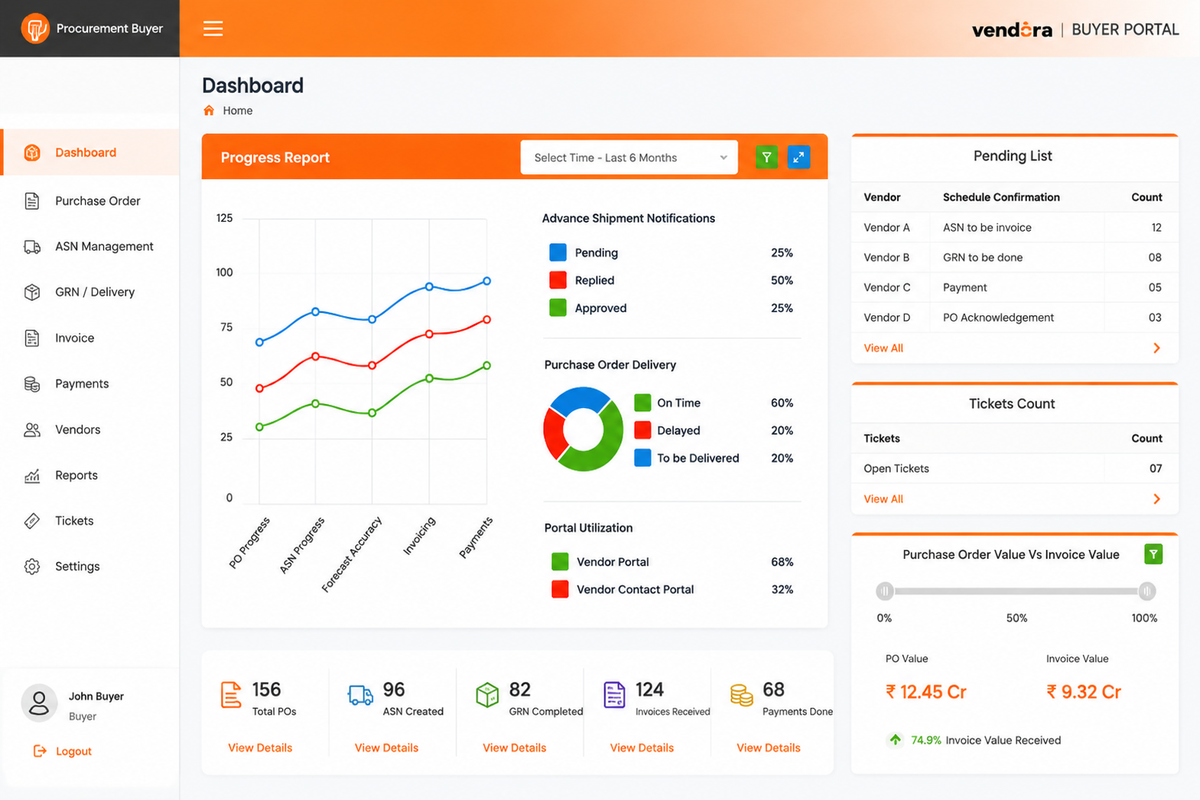
Example GRN dashboard view for monitoring received goods, quantity validation, discrepancy tracking, quality status, and invoice readiness.
Core Capabilities of Vendora Goods Receipt Note Software
GRN Creation
Create a Goods Receipt Note when vendor goods are delivered to stores, warehouse, or receiving location.
- GRN number
- Delivery date
- Vendor name
- Receiving location
PO Reference Tracking
Link received goods with the relevant purchase order for better procurement, quantity, and invoice visibility.
- PO number
- Item details
- Ordered quantity
- Delivery commitment
ASN Linkage
Compare received goods with Advance Shipping Notice information submitted by vendors before delivery.
- ASN reference
- Dispatch quantity
- Shipment documents
- Expected delivery date
Received Quantity Tracking
Record the quantity and type of goods received from vendors and compare them with expected quantities.
- Received quantity
- Short quantity
- Excess quantity
- Item mismatch
Accepted and Rejected Quantity
Track accepted goods, rejected goods, damaged goods, and items requiring quality inspection or vendor clarification.
- Accepted quantity
- Rejected quantity
- Damaged goods
- Inspection status
Discrepancy Management
Manage differences between PO, ASN, delivered quantity, received quantity, and accepted quantity.
- Quantity discrepancy
- Wrong item received
- Missing documents
- Vendor clarification
Quality Inspection Connection
Connect GRN with quality inspection where goods require inspection before acceptance or invoice processing.
- Inspection required
- Quality status
- Inspection remarks
- Rejection reason
Inventory Update Support
Support inventory visibility by recording what goods have been received, what is pending, and what is rejected.
- Inventory receipt status
- Pending receipt
- Stock readiness
- ERP-connected update support
GRN Reports
Track pending GRNs, delayed receipts, vendor delivery accuracy, rejected quantity, and discrepancy trends.
- Pending GRN report
- Delivery accuracy report
- Rejected quantity report
- Vendor performance report
Stores, Vendor, Procurement and Finance Actions
| Workflow Step | Stores / Receiving Action | Vendor Action | Procurement / Finance Action | Business Value |
|---|---|---|---|---|
| Goods Arrive | Receives goods and checks delivery details against PO and ASN. | Provides shipment details, documents, and clarification where needed. | Tracks whether delivery has arrived against open PO. | Improves receiving visibility and reduces manual delivery follow-ups. |
| GRN Created | Creates GRN with vendor, PO, ASN, item, quantity, and location details. | Gets receipt visibility where configured. | Uses GRN status for procurement and invoice readiness. | Creates a structured record of received goods. |
| Quantity Check | Records received, accepted, rejected, short, excess, or damaged quantity. | Responds to shortage, excess, or discrepancy clarification. | Tracks mismatch cases and vendor delivery accuracy. | Improves quantity validation and supplier accountability. |
| Quality Status | Marks inspection requirement or updates quality status where configured. | Responds to rejection, defect, or clarification requests. | Uses quality status for GRN, invoice, and vendor performance reporting. | Connects receiving with quality and vendor performance control. |
| Invoice Ready | Confirms receipt and accepted quantity. | Uploads invoice or checks invoice readiness where enabled. | Validates invoice against PO, ASN, GRN, and accepted quantity. | Supports faster invoice approval and fewer payment disputes. |
Why GRN Matters in Vendor Management
Reduce Receiving Errors
Validate item type, received quantity, delivery date, and vendor details before goods are accepted.
Improve Inventory Accuracy
Maintain clearer visibility into what has been received, what is pending, and what has been rejected.
Support Invoice Matching
Help finance teams validate invoices against PO, ASN, GRN, received quantity, and accepted quantity.
Improve Vendor Accountability
Track delivery accuracy, shortage, excess, rejection, delayed delivery, and repeated vendor discrepancies.
Reduce Manual Follow-Ups
Give procurement, stores, quality, and finance teams better visibility into receipt status.
Strengthen Audit Readiness
Maintain digital GRN records, receipt history, discrepancy details, and vendor delivery evidence.
GRN Before and After Vendora
| GRN Area | Before Vendora | With Vendora GRN Software |
|---|---|---|
| Goods Receipt | Goods receipt is recorded manually through paper, spreadsheets, or disconnected inventory updates. | Receiving teams can create a structured GRN linked with vendor, PO, ASN, and item details. |
| Quantity Validation | Received quantity is manually compared with PO and delivery documents. | Received, accepted, rejected, shortage, and excess quantity can be tracked in the workflow. |
| Discrepancy Handling | Mismatch issues are handled through emails, calls, and informal communication. | Discrepancies can be recorded, assigned, clarified, and tracked with vendor visibility. |
| Quality Linkage | Quality status may be disconnected from stores, GRN, and invoice readiness. | GRN can connect with quality inspection, accepted quantity, rejected quantity, and inspection remarks. |
| Invoice Readiness | Finance teams manually check whether goods were received before processing invoices. | Invoice workflows can use GRN status to support matching, approval, and payment visibility. |
| Vendor Performance | Vendor delivery accuracy and discrepancy trends are difficult to measure. | Reports can show delivery accuracy, rejection trends, shortage cases, and vendor performance. |
Who Uses Vendora Goods Receipt Note Software?
Stores and Receiving Teams
Create GRNs, record received quantity, identify shortages, update receipt status, and manage goods receipt records.
Procurement Teams
Track vendor delivery accuracy, pending GRNs, delayed receipts, PO fulfillment, and supplier performance.
Vendors and Suppliers
Receive visibility into receipt status, shortages, rejected goods, discrepancy queries, and clarification requirements.
Quality Teams
Review inspection requirements, accepted quantity, rejected quantity, quality remarks, and inspection outcomes.
Finance Teams
Validate invoice readiness by checking GRN status, accepted quantity, PO alignment, and discrepancy closure.
Management Teams
Monitor receiving delays, vendor delivery accuracy, pending GRNs, rejection trends, and procurement bottlenecks.
GRN KPIs to Track
GRN Cycle Time
Time taken from goods arrival to GRN creation and receipt confirmation.
Receipt Accuracy
Match between PO quantity, ASN quantity, delivered quantity, and received quantity.
Pending GRN
Goods delivered but waiting for receipt confirmation, validation, or quality status.
Rejected Quantity
Goods rejected due to quality issues, damage, wrong items, or specification mismatch.
Shortage Cases
Deliveries where received quantity is lower than PO or ASN quantity.
Excess Quantity
Deliveries where quantity received is higher than expected or approved.
Invoice Readiness
GRNs ready for invoice matching, approval, and payment processing.
Vendor Delivery Score
Vendor performance based on timely delivery, quantity accuracy, and discrepancy trends.
GRN as Part of a Connected Procurement Workflow
Vendora GRN software is part of a broader vendor management and procurement workflow. Goods Receipt Note tracking connects purchase order, ASN, receiving, quality inspection, invoice upload, payment visibility, and vendor performance reporting.
In ERP-connected environments, SAP, Oracle, or another ERP may remain the system of record for inventory, accounting, and financial transactions, while Vendora improves vendor-facing receipt visibility, discrepancy communication, and workflow tracking.
Related Vendora Product Pages
Goods Receipt Note Software FAQs
What is a Goods Receipt Note?
A Goods Receipt Note, or GRN, is a document or digital record that confirms goods have been received into a warehouse, stores, or inventory system.
How does Vendora help with GRN management?
Vendora helps teams create GRNs, record received quantity, track accepted and rejected quantity, manage discrepancies, connect GRN with PO and ASN, and support invoice readiness.
Can GRN be linked with purchase orders?
Yes. Vendora can help link GRN records with purchase orders so teams can compare ordered quantity, delivered quantity, received quantity, and accepted quantity.
Can GRN be connected with ASN?
Yes. GRN can be connected with ASN workflows to compare expected shipment details with actual goods received.
Does GRN help with invoice processing?
Yes. GRN helps finance teams validate whether goods were received and accepted before invoice approval and payment processing.
Can Vendora track rejected quantity?
Yes. Vendora can help track accepted quantity, rejected quantity, damaged goods, shortage, excess, and discrepancy details.
Who uses Goods Receipt Note software?
Goods Receipt Note software is used by stores teams, receiving teams, procurement teams, vendors, quality teams, finance users, management users, IT users, and admin teams.
How can we evaluate Vendora GRN software?
Book a product demo and share your vendor count, monthly PO volume, receiving process, ASN workflow, quality inspection process, ERP system, and expected go-live timeline.
Ready to Digitize Goods Receipt Note Tracking?
Book a Vendora demo to see how GRN creation, goods receipt tracking, PO and ASN matching, accepted and rejected quantity, discrepancy management, quality inspection, invoice readiness, and vendor performance reports can work for your procurement process.
Book Product Demo Request Quote![A modern smartphone showing the [Vendor Portal Management System] dashboard for on-the-go vendor collaboration.](https://www.vendorascmsoftware.com/wp-content/themes/vendora/images/phone.webp)
