
Quality Inspection Software for Vendor Quality Control
Vendora quality inspection software helps procurement, quality, stores, and vendor teams inspect received goods, record defects, capture non-conformance details, track accepted and rejected quantities, manage supplier clarifications, and improve vendor performance visibility.
Replace paper checklists, spreadsheets, manual remarks, scattered evidence, and email-based supplier follow-ups with a digital quality inspection workflow connected with purchase orders, ASN, GRN, supplier scorecards, and vendor performance reports.
Quality Criteria
Define inspection criteria, product specifications, defect rules, tolerance levels, and checklist items.
Inspection Tracking
Track inspections against PO, ASN, GRN, received quantity, accepted quantity, and rejected quantity.
Defect Capture
Record non-conformance, defects, remarks, images, videos, and supplier clarification requirements.
Supplier Scorecard
Analyze supplier quality trends, rejection history, inspection outcomes, and vendor performance.
Why Companies Need Quality Inspection Software
Manual Inspection Records
Quality teams may record defects, remarks, accepted quantity, rejected quantity, and non-conformance details manually, making audit and reporting difficult.
Weak Supplier Accountability
Vendors may not receive structured clarification requests, defect evidence, rejection reasons, or corrective action follow-ups in one controlled workflow.
Disconnected Quality Data
Inspection outcomes may not be connected with purchase orders, ASN, GRN, invoice readiness, vendor reports, or supplier performance scorecards.
Vendora Turns Quality Inspection Into a Connected Workflow
Vendora Quality Inspection Dashboard Preview
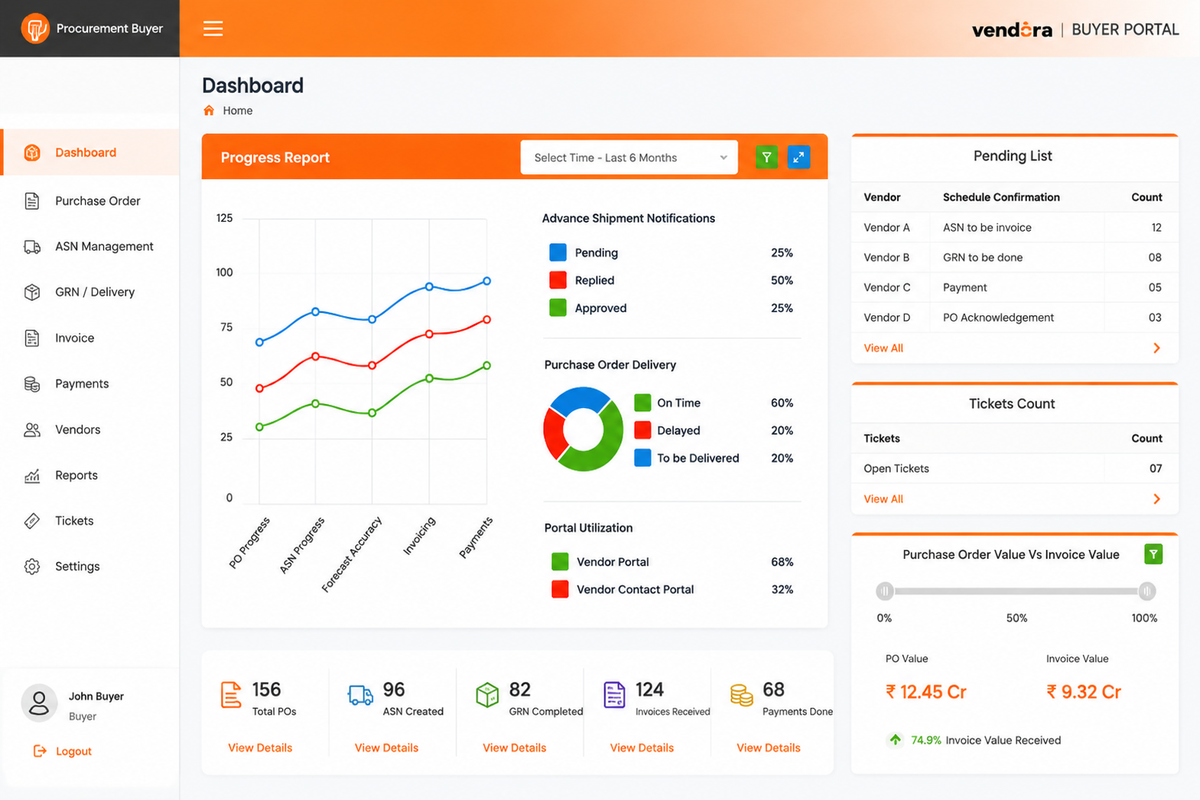
Example quality inspection dashboard view for monitoring inspection outcomes, defect trends, supplier clarifications, and vendor quality performance.
Quality Inspection Process Steps
Define Quality Criteria
Define product specifications, accepted standards, defect rules, tolerance levels, delivery expectations, and checklist items.
Set Up Inspections
Plan inspections at vendor facility, buyer location, stores, goods receipt stage, or other configured inspection points.
Conduct Quality Checks
Inspect received goods and capture accepted quantity, rejected quantity, inspection remarks, defects, and non-compliance details.
Capture Evidence
Attach images, videos, remarks, non-conformance proof, and issue details to improve vendor communication.
Request Clarification
Send quality issues to vendors and track responses, correction requests, corrective actions, and closure status.
Analyze Quality Data
Review defect trends, rejection rates, repeated quality issues, supplier history, and scorecard performance.
Core Capabilities of Vendora Quality Inspection Software
Inspection Checklist
Create structured inspection checklists based on product type, supplier category, item specifications, or buyer standards.
- Quality attributes
- Inspection parameters
- Accepted standards
- Checklist-based review
Defect and Non-Conformance Capture
Record quality issues, non-conformance details, defect type, severity, rejection reason, and inspector remarks.
- Defect category
- Non-compliance status
- Severity level
- Inspection remarks
Image and Video Evidence
Capture supporting proof of defects or inspection observations to improve quality communication with vendors.
- Image attachment
- Video reference
- Annotation support
- Issue proof history
Accepted and Rejected Quantity
Track received quantity, accepted quantity, rejected quantity, shortage, excess, and discrepancy status.
- Received quantity
- Accepted quantity
- Rejected quantity
- Quantity discrepancy
Vendor Clarification Workflow
Communicate quality issues to vendors and track clarifications, responses, corrective actions, and closure status.
- Supplier clarification
- Correction request
- Vendor response
- Closure tracking
GRN and ASN Linkage
Connect inspection results with ASN, goods receipt, GRN, purchase orders, and invoice readiness where configured.
- ASN reference
- GRN status
- PO linkage
- Invoice readiness
Quality Approval Workflow
Route inspection outcomes for review, approval, rejection, or escalation based on company quality rules.
- Reviewer approval
- Escalation flow
- Rejection approval
- Audit trail
Vendor Quality Reports
Generate reports on defect trends, rejection rate, supplier quality history, repeat issues, and inspection performance.
- Defect trend report
- Rejection analysis
- Supplier quality report
- Inspection aging
Supplier Scorecards
Use inspection data to support vendor scorecards, supplier reviews, negotiations, and performance improvement plans.
- Quality score
- Repeated issue tracking
- Vendor comparison
- Performance history
Quality Team, Vendor, and Procurement Actions
| Workflow Step | Quality Team Action | Vendor Action | Procurement / Stores Action | Business Value |
|---|---|---|---|---|
| Inspection Setup | Defines checklist, criteria, defect rules, and tolerance levels. | Understands required quality expectations where shared. | Links inspection with PO, ASN, or goods receipt process. | Standardizes quality expectations before inspection. |
| Quality Check | Inspects received goods and records accepted or rejected quantity. | Waits for inspection outcome or clarification request. | Tracks GRN readiness and receiving movement. | Improves control over accepted and rejected material. |
| Defect Capture | Records defect type, severity, remarks, evidence, and non-conformance. | Reviews defect details and submits response where required. | Uses inspection result for procurement and stores visibility. | Creates traceable defect and evidence history. |
| Clarification | Raises supplier clarification or correction request. | Responds with explanation, correction, or corrective action. | Monitors vendor response and closure status. | Improves supplier accountability and issue closure. |
| Scorecard | Analyzes quality outcomes and repeated defects. | Improves future quality performance based on feedback. | Uses quality data for vendor evaluation and sourcing decisions. | Supports better supplier performance management. |
Quality Inspection Before and After Vendora
| Quality Area | Before Vendora | With Vendora Quality Inspection |
|---|---|---|
| Inspection Criteria | Quality criteria may be managed through paper checklists, spreadsheets, or informal notes. | Inspection criteria and checklist items can be managed in a structured digital workflow. |
| Defect Recording | Defects are recorded manually and may not be linked with vendor or PO history. | Defects, remarks, evidence, accepted quantity, and rejected quantity are captured in one place. |
| Vendor Communication | Quality issues are shared through emails, calls, and scattered attachments. | Vendors can receive clarification requests and respond through a controlled workflow. |
| GRN and Receipt | Quality status may be disconnected from goods receipt and procurement records. | Inspection results can support GRN, invoice readiness, and supplier performance visibility. |
| Quality Analytics | Vendor quality trends are difficult to analyze without manual reports. | Quality reports can show defect trends, rejection rate, repeated issues, and vendor scorecard data. |
Who Uses Vendora Quality Inspection Software?
Quality Teams
Define inspection criteria, perform inspections, capture defects, record quantity decisions, and close quality outcomes.
Procurement Teams
Track supplier quality performance, repeated vendor issues, inspection delays, and vendor clarification status.
Vendors and Suppliers
Respond to quality clarifications, review inspection remarks, submit corrective responses, and improve delivery quality.
Stores and Receiving Teams
Coordinate received quantity, GRN status, accepted quantity, rejected quantity, and material movement after inspection.
Management Teams
Monitor vendor quality trends, rejection rate, supplier scorecards, and procurement-related quality risks.
IT and Admin Teams
Configure roles, permissions, inspection workflows, notifications, reports, and integration settings.
Quality Inspection KPIs to Track
Defect Rate
Number of defective items or non-conformances compared to inspected quantity.
Rejection Rate
Rejected quantity compared to received quantity or inspected quantity.
Inspection Cycle Time
Time taken from goods receipt to inspection completion and quality decision.
Supplier Quality Score
Quality performance score based on defects, rejections, repeat issues, and closure history.
Repeat Issues
Repeated defects, recurring non-conformance, or repeated supplier quality failures.
Clarification Aging
Time taken by vendors to respond to quality clarification or correction requests.
GRN Readiness
Inspected goods ready for GRN, accepted quantity, and pending inspection cases.
Scorecard Trend
Vendor quality trend over time for procurement reviews and supplier negotiations.
Quality Inspection as Part of a Connected Vendor Management Workflow
Vendora quality inspection can follow purchase order, ASN, and goods receipt activities. Inspection outcomes can support GRN, invoice readiness, vendor performance reporting, supplier reviews, and supplier scorecards.
In ERP-connected environments, SAP, Oracle, or another ERP may remain the system of record, while Vendora improves the vendor-facing quality communication and inspection visibility layer.
Related Vendora Product Pages
Quality Inspection Software FAQs
What is quality inspection software?
Quality inspection software helps companies define quality criteria, inspect vendor deliveries, record defects, track accepted and rejected quantities, manage supplier clarifications, and analyze vendor quality performance.
How does Vendora help with quality inspection?
Vendora helps teams manage inspection checklists, defect capture, non-conformance tracking, evidence upload, quality status, vendor clarification, GRN linkage, reports, and supplier scorecards.
Can Vendora capture defects and non-conformance details?
Yes. Vendora can help inspectors record defects, non-compliance, rejected quantity, inspection remarks, evidence, and supplier clarification requirements.
Can quality inspection be linked with ASN and GRN?
Yes. Vendora can support quality inspection workflows connected with ASN, goods receipt, accepted quantity, rejected quantity, GRN status, and invoice readiness where configured.
Does Vendora support supplier scorecards?
Yes. Quality inspection data can support supplier scorecards by tracking defect trends, rejection rates, repeated issues, inspection outcomes, and vendor performance history.
Who uses quality inspection software?
Quality inspection software is used by quality teams, procurement teams, vendors, stores teams, receiving teams, management users, IT users, and admin teams.
How can we evaluate Vendora quality inspection software?
Book a product demo and share your vendor count, inspection process, quality criteria, defect tracking requirements, ERP system, GRN process, and expected go-live timeline.
Ready to Improve Vendor Quality Inspection?
Book a Vendora demo to see how quality criteria, inspection checklists, defect capture, accepted and rejected quantity, vendor clarification, GRN linkage, supplier scorecards, and quality reports can work for your procurement process.
Book Product Demo Request Quote![A modern smartphone showing the [Vendor Portal Management System] dashboard for on-the-go vendor collaboration.](https://www.vendorascmsoftware.com/wp-content/themes/vendora/images/phone.webp)
