

Vendor Portal Software
Vendor Portal Software for Buyer-Vendor Collaboration
Vendora vendor portal software helps procurement, finance, stores, quality, IT, and supplier teams manage RFQ responses, purchase order acknowledgement, ASN submission, GRN visibility, invoice upload, payment queries, and vendor communication through one structured self-service portal.
Replace scattered vendor emails, repeated phone calls, spreadsheet follow-ups, and unclear procurement status updates with a digital vendor portal built for manufacturing and procurement-driven organizations.
Vendor Self-Service
Give suppliers a portal to respond to RFQs, acknowledge POs, submit ASN, upload invoices, and raise queries.Buyer Visibility
Track vendor responses, pending confirmations, shipment updates, invoice movement, and open vendor actions.Finance Clarity
Reduce repeated invoice and payment-status follow-ups with controlled vendor-facing visibility.ERP Alignment
Use Vendora as a vendor-facing portal around SAP, Oracle, or other ERP-backed procurement workflows.Why Companies Need Vendor Portal Software
Too Many Vendor Follow-Ups
Procurement and finance teams spend too much time answering vendor questions about POs, dispatch details, goods receipt, invoice status, and payments.Scattered Communication
Vendor updates often arrive through emails, calls, spreadsheets, and disconnected files, making it difficult to track the latest status.Limited Vendor Visibility
Vendors may not know where a PO, ASN, GRN, invoice, or payment query is pending, creating repeated communication and avoidable delays.Vendora Turns Vendor Communication Into a Connected Portal Workflow
Vendor Login
RFQ Response
PO Acknowledgement
ASN Submission
GRN Visibility
Invoice Upload
Ticket / Payment Query
Vendora Vendor Portal Dashboard Preview
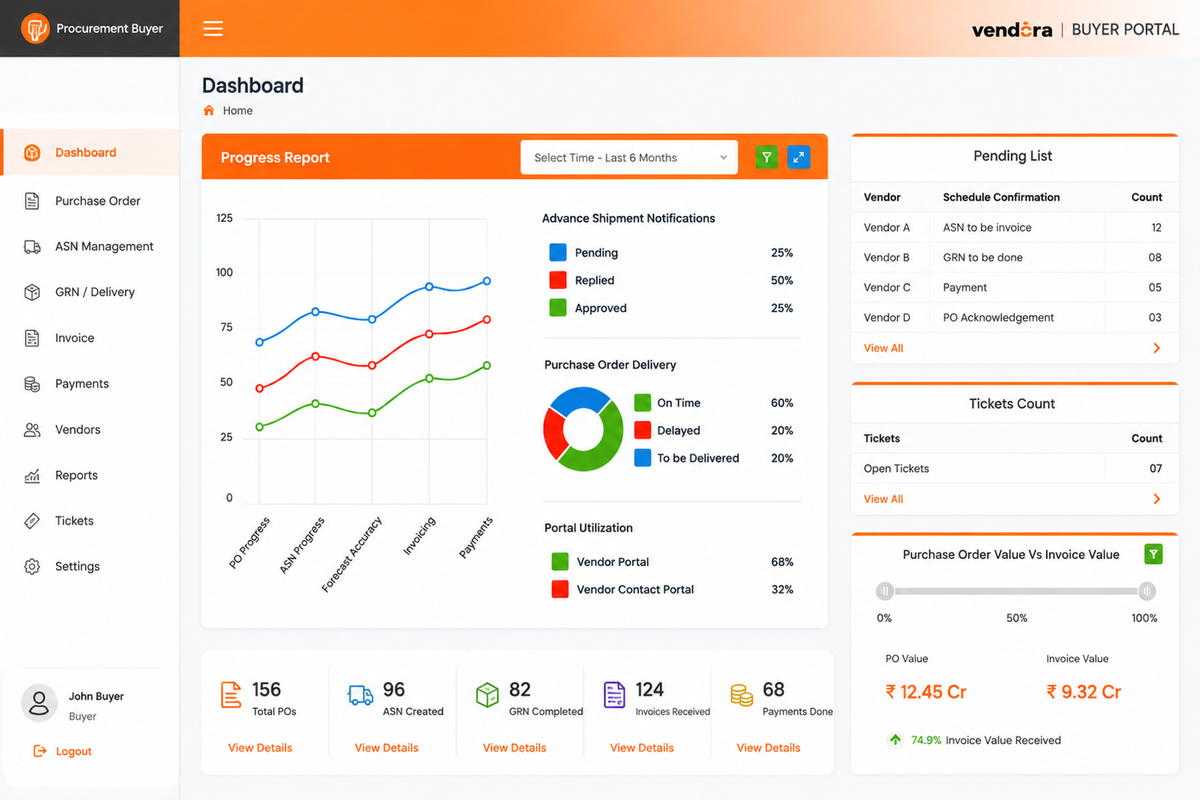 Example vendor portal view for tracking supplier actions, PO acknowledgement,
ASN submission, invoice upload, and workflow status.
Example vendor portal view for tracking supplier actions, PO acknowledgement,
ASN submission, invoice upload, and workflow status.Core Capabilities of Vendora Vendor Portal Software
Vendor Login and Access Control
Give approved vendors secure portal access with role-based visibility and controlled access to procurement workflows.- Vendor login access
- Role-based permissions
- Controlled data visibility
- Secure supplier communication
RFQ Response Portal
Vendors can view RFQs, submit quotations, upload attachments, and respond through one structured workflow.- RFQ visibility
- Quotation submission
- Attachment upload
- Response tracking
Purchase Order Acknowledgement
Vendors can view purchase orders, acknowledge receipt, confirm delivery readiness, or raise clarification requests.- PO visibility
- Vendor acknowledgement
- Delivery confirmation
- PO clarification workflow
ASN and Shipment Submission
Vendors can submit advance shipment notices with dispatch details, expected arrival, transport information, and supporting documents.- ASN creation
- Dispatch details
- Shipment document upload
- Expected delivery visibility
GRN and Quality Status Visibility
Vendors can view goods receipt and quality-related status where enabled by the buyer organization.- GRN status visibility
- Accepted quantity
- Rejected quantity
- Quality remarks visibility
Invoice Upload and Payment Tracking
Vendors can upload invoices, attach required documents, track invoice movement, and view payment status where configured.- Invoice upload
- Document attachment
- Invoice status tracking
- Payment query reduction
Before and After Vendora Vendor Portal
| Area | Before Vendora | With Vendora Vendor Portal |
|---|---|---|
| RFQ Response | Vendors send quotes through email and attachments are tracked manually. | Vendors respond to RFQs and upload documents through the portal. |
| PO Acknowledgement | Buyers call or email vendors to confirm PO acceptance and delivery readiness. | Vendors acknowledge POs and update delivery commitments through the portal. |
| Shipment Updates | Dispatch details are shared through phone, email, or spreadsheets. | Vendors submit ASN with shipment and document details in a structured workflow. |
| GRN and Quality Status | Vendors repeatedly ask buyers or stores teams for goods receipt and rejection details. | GRN and quality-related visibility can be shared with vendors based on access rules. |
| Invoice and Payment Queries | Finance teams receive repeated invoice and payment follow-ups from vendors. | Vendors can upload invoices and track invoice or payment progress where configured. |
ERP-Connected, Not ERP-Replacing
Vendora improves how vendors and internal teams communicate, update, review, track, and resolve procurement activities around those ERP records.Vendor Portal Software FAQs
What is vendor portal software?
Vendor portal software is an online platform where suppliers can log in to view RFQs,
purchase orders, shipment status, GRN visibility, invoice status, payment information,
and communication requests from the buyer.
How does Vendora work as a vendor portal?
Vendora gives vendors a self-service portal to respond to RFQs, acknowledge purchase orders,
submit ASN, upload invoices, raise tickets, and track approved workflow status.
Can vendors acknowledge purchase orders in Vendora?
Yes. Vendors can view purchase orders and acknowledge, confirm, reject, or raise
clarification requests based on the buyer’s configured workflow.
Can vendors upload invoices through the portal?
Yes. Vendors can upload invoices and required documents through the portal.
Finance teams can review invoice movement and reduce repeated payment-status queries.
Does Vendora replace SAP or ERP?
No. Vendora does not replace SAP, Oracle, or another ERP. It works as a vendor-facing
collaboration and visibility layer around ERP-backed procurement workflows.
Ready to Improve Buyer-Vendor Collaboration?
Book a Vendora product demo to see how vendor login, RFQ response, PO acknowledgement, ASN submission, GRN visibility, invoice upload, payment tracking, and ERP-connected vendor portal workflows can work for your procurement process.Book Product Demo Request Quote
![A modern smartphone showing the [Vendor Portal Management System] dashboard for on-the-go vendor collaboration.](https://www.vendorascmsoftware.com/wp-content/themes/vendora/images/phone.webp)
